Canadian players comparing mobile casino access may expect an app-store installation, but Betscore’s mobile experience is built around a responsive website instead. The same browser-based platform brings together casino games, live tables, sportsbook features, promotions and account tools. Before choosing a mobile setup, review the operator’s stated age, account and verification requirements, then compare the practical steps described in this betscore app download resource. This approach can be useful for players who want mobile access without adding another gambling application to an iPhone or Android device.

How the Betscore mobile website works
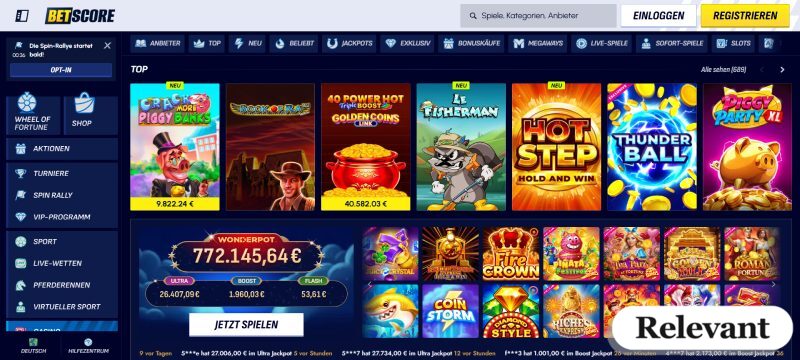
Betscore operates through a responsive mobile website rather than requiring a native casino app from the Apple App Store or Google Play. In practical terms, you open the service in a mobile browser and the layout adapts to the smaller screen. Menus, game tiles, account areas and promotional pages are designed to remain usable without a desktop monitor.
The mobile browser version covers several parts of the wider platform. Depending on the account and current availability, users can browse casino titles, enter the live casino lobby, view sportsbook markets, check promotions and manage cashier-related functions. This makes the mobile site more than a games-only page, although particular payment methods and features should always be checked in the live interface.
There is also no need to create a separate mobile profile. The source material states that desktop and mobile browser sessions use the same account, balance and login. That can make switching devices straightforward, but it also means account credentials should be protected carefully. Access is intended for adults who meet the legal gambling age and rules applicable where they live.
Creating a convenient home-screen shortcut
A browser shortcut can make the mobile website feel closer to an installed app. On Android, the usual route is to open the Betscore website in the browser, open the browser menu and choose the option labelled “Add to Home screen” or similar. The exact wording can vary between browsers and Android versions, so the device’s current menu should be followed.
On an iPhone, open the site in Safari and use the Share menu. The available action for adding a home-screen icon is generally labelled “Add to Home Screen”. After confirming, an icon appears alongside other apps. Selecting it opens the saved website address in the browser environment; it does not turn the service into a separately installed native application.
Shortcuts are useful for convenience, but they do not change account security, payment rules or game conditions. If the shortcut stops working, opening the website directly in the browser can help identify whether the issue is the saved icon or the service itself. Avoid saving login details on a shared device, and use a screen lock where appropriate.
What you can do on mobile
The casino catalogue is broad enough that mobile users may want to narrow their choices rather than scroll through every title. Available navigation includes categories such as Top, New, Popular, Exclusive, Bonus Buys, Megaways, Live Games, Instant Games, Jackpots, Slots and Table Games. Provider filters are also available, which can help when looking for a familiar studio.
Live casino access is another notable part of the mobile experience. The lobby includes streamed dealer formats and sections covering roulette, blackjack, baccarat, dice, poker and game shows. The catalogue also includes standard slots and table games. Demo play is available for many casino titles, while real-money play requires an account and login.
Mobile access also extends beyond casino browsing. The platform combines casino and sportsbook functions under one account, with sports betting and live betting presented alongside the other services. Promotions, tournaments, rewards-shop information and VIP-level features may also be available through the account interface. The precise display can vary by device, browser and current platform configuration.
Connection, browser and account considerations
A responsive design cannot compensate for every mobile problem. A weak Wi-Fi or mobile-data connection may cause slow loading, interrupted streams or delayed updates, particularly in live casino areas. Closing unused tabs, switching between a stable network and mobile data, and keeping the browser current are sensible troubleshooting steps, although they cannot guarantee uninterrupted play.
If account access fails, credentials are case-sensitive. The login screen includes a password-recovery option that sends a reset message to the registered email address. When a reset email does not arrive, checking the junk folder and confirming the correct registered address may help. For persistent problems, Betscore directs users to customer support; a screenshot of an error can make the issue easier to describe.
Browser cookies and cache can also affect login or page behaviour. Clearing them, or testing another browser, is among the troubleshooting steps described for access problems. Since personal details must remain accurate and up to date, changes to account information should be handled through the stated support channels rather than by creating another profile. The general terms permit only one account per person and certain connected identifiers.
Mobile play with sensible boundaries
Mobile convenience can make gambling easier to reach, which is precisely why deliberate limits matter. Before opening a game, decide how much time and money is affordable to lose, and treat that amount as entertainment spending rather than expected income. A small screen and quick loading can make repeated decisions feel automatic, so planned breaks are worth building into a session.
Bonuses require particular care on mobile because important conditions may sit behind a promotions or My Bonuses area. The Canadian welcome package described in the source has deposit, wagering, time, game-contribution and maximum-bet conditions. Offers may also need to be activated before qualifying play. Read the current terms on the platform before accepting an offer, rather than relying on an old description or assuming every game contributes equally.
Betscore provides responsible-gaming support that includes temporary breaks and self-exclusion through customer support. Self-exclusion can be requested by email, after which the account is closed as soon as practicable. Support is listed as available through live chat and email, with assistance covering account, verification, technical and withdrawal questions. If gambling is becoming difficult to control, use those controls and seek independent support promptly.
FAQ
Does Betscore have a native mobile app?
The supplied information describes a responsive mobile website rather than a native casino application distributed through the App Store or Google Play. Players can use a browser on iOS or Android and optionally add a home-screen shortcut. That shortcut opens the website and does not install a separate native app.
Can the same account be used on mobile and desktop?
Yes. The mobile and desktop browser sessions use the same account, balance and login. Real-money casino play requires an account and login, while demo play is available for many titles. Keep credentials private, especially when accessing the account from a shared phone, tablet or public network.
What should I do if mobile login does not work?
Check the case-sensitive username, email and password, then use the login recovery option if necessary. Clearing browser cookies and cache or trying another browser may help. If the problem continues, contact customer support and include a screenshot of the displayed error where possible.